Rule Simulator
Check what the engine would do to a real record, without awarding anything.
Access it via Novigem Admin > Settings > Rule Simulator.
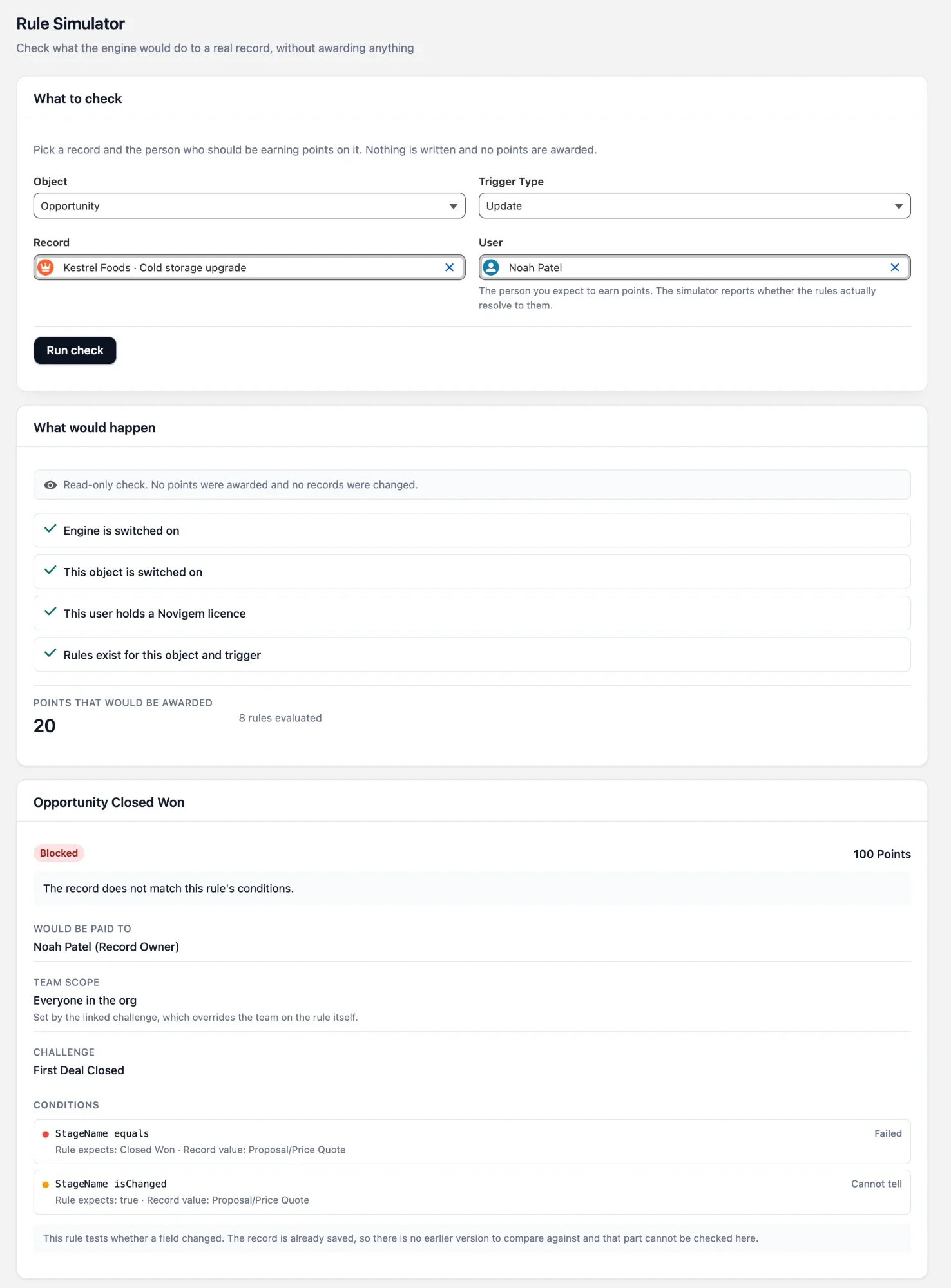
Use it when a rule “isn’t firing”: pick the record and the person you expect to earn points, and the simulator walks the same checks the engine makes on a save. It stops at the first gate that fails and explains it.
The simulator is read-only. It awards no points, writes no ledger entries, publishes no celebrations, and changes no records.
Who can use it
| Requirement | Why |
|---|---|
| Novigem Admin permission set | The screen and the check both require Novigem admin access. |
| A Novigem licence on your own user | Without one, the check refuses to run, because it cannot reliably report licence status for anyone else. Have a licensed admin run it instead. |
| Read access to the record | The record is read with your own permissions. A record you cannot see reports “That record no longer exists, or you do not have access to it.” |
What to check
The What to check card has four inputs.
| Input | Description |
|---|---|
| Object | The objects the rule builder offers: every registered tracked object that exists in this org. |
| Trigger Type | Create or Update. Defaults to Update. Only rules with the same trigger type are checked. |
| Record | A real record of that object. Searches by Name, or by Subject for Task and Event. |
| User | The person you expect to earn points. The simulator reports whether the rules actually resolve to them. |
Click Run check. Changing any input clears the previous result.
What would happen
Results open with a read-only note, then the gate checks in the order the engine decides them. The list stops at the first check that fails, so you read one answer, not four.
| Check | If it fails |
|---|---|
| Engine is switched on | The master kill switch is off, so no rule evaluates for anyone. Turn Enable Rule Engine back on under General settings. The run stops here. |
| This object is switched on | The object is not enabled under Tracked Objects, so the engine never runs for it. The run stops here. |
| This user holds a Novigem licence | The user you picked has no Novigem package licence. This one does not stop the run: a rule pays whoever its actor mode resolves to on the record, which may be a different, licensed person. Check the per-rule detail. |
| Rules exist for this object and trigger | No active rule targets this object and trigger type, so there is nothing to evaluate. |
A rule counts here only if the engine would load it on a real save: it is active, and if it belongs to a challenge, that challenge is Active. For a Timebound challenge or a battle, the current time must also be inside its start and end dates.
When rules are found, a summary shows Points that would be awarded and how many rules were evaluated.
Per-rule detail
Each rule gets its own card, in the order the engine evaluates rules.
| Field | Description |
|---|---|
| Status | Would award or Blocked, with the rule’s points. |
| Reason | Shown when blocked. See the table below. |
| Would be paid to | The user the rule’s actor mode (Record Owner, Created By, or Last Modified By) resolves to on this record. A note appears when this is not the user you picked. |
| Team scope | The team that governs the rule, or Everyone in the org. A note appears when the team comes from the linked challenge, which overrides the team on the rule itself. |
| Challenge | The linked challenge, if any. |
| Conditions | Each condition with its field and operator, what the rule expects, the record value, and Passed, Failed, or Cannot tell. |
Why a rule is blocked
A blocked rule explains itself in one sentence:
| Cause | What the card says |
|---|---|
| No actor | The rule’s actor mode resolves to nobody on this record, so there is no one to pay. |
| Actor has no licence | The person this rule would pay holds no Novigem package licence, so the engine skips the award silently. |
| Outside the team | The person this rule would pay is not a member of the team that governs it. |
| Conditions | The record does not match this rule’s conditions. |
| Broken conditions | This rule’s conditions could not be evaluated. Reopen it in the rule builder and save it again. |
| One-time challenge done | The linked one-time challenge is already complete for this person, so its rules have stopped awarding. |
| Already paid | This rule already awarded on this record. The engine skips repeats, so saving it again pays nothing. |
A frequent answer is Would be paid to naming someone else: the rule pays the record owner, and the person you expected is not the owner. See Actor modes.
Limits
- “Field changed” conditions show Cannot tell. The record is already saved, so there is no earlier version to compare against. The card says so, and the rule’s overall verdict treats the field as having had no earlier value, so read it with care.
- It reads the record as it is now. Values are the saved values, not the ones from the save you are investigating.
- It checks one record and one save. It does not show progress toward a challenge target, completion bonuses, or badges.
Next steps
- Troubleshooting: other reasons a rule does not award points
- Rules Field Reference: actor modes, conditions, and operators
- General Settings: the kill switch, tracked objects, and teams