Progress Tracking
Progress Tracking turns raw Ledger data into visual insights that motivate users and give managers real-time visibility. Individual and team momentum are displayed through dashboards and leaderboards, creating a feedback loop that reinforces positive behaviors.
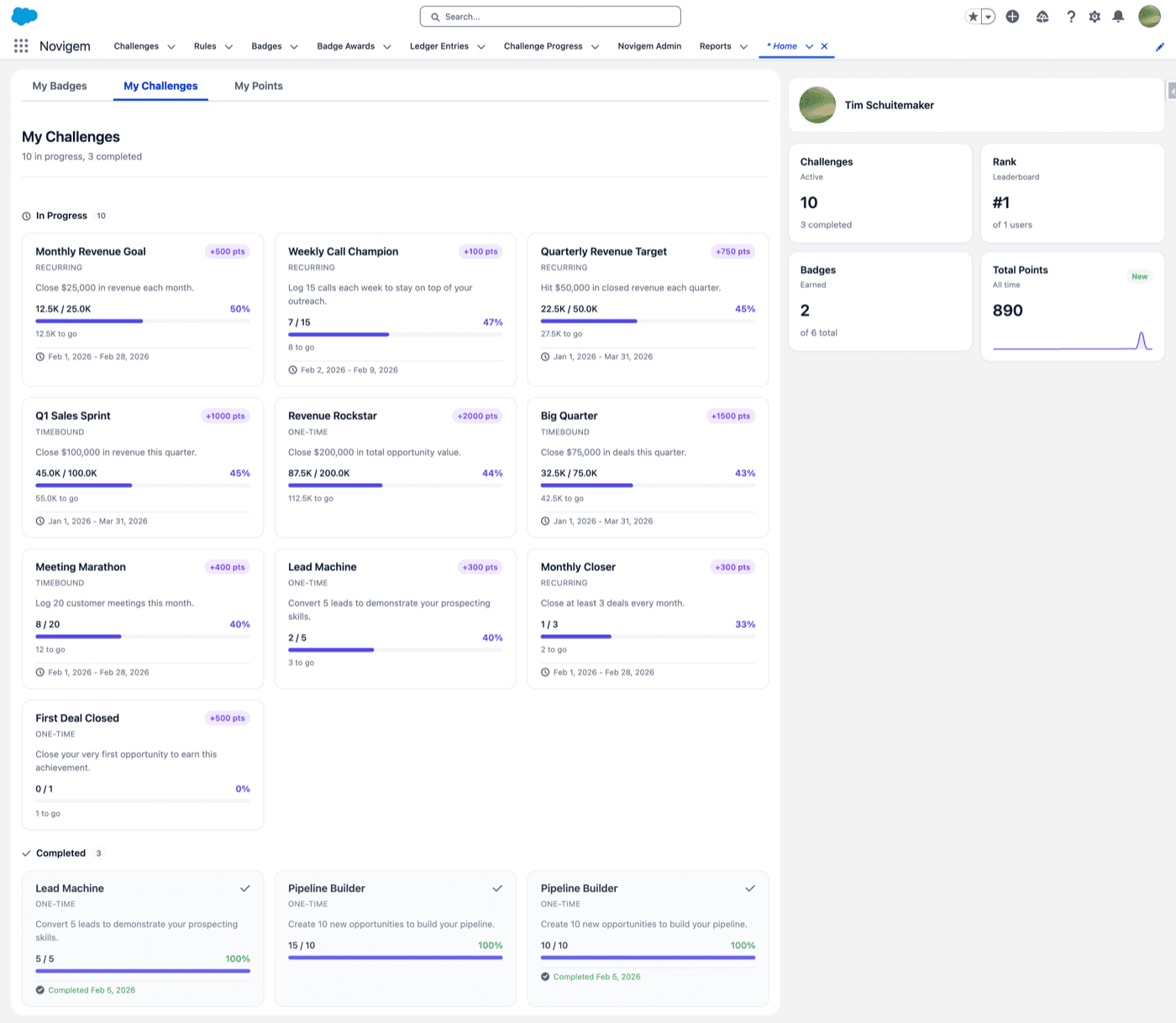
What users can see
- Challenge progress
- Goal pace on challenges with a start and an end date: Ahead of pace, On track, or Behind pace, plus a detail line such as “Need 4/day to finish”
- Points earned over time
- Daily and weekly streaks, best day, best week, and personal bests
- Personal leaderboards
- Milestones unlocked
- Badges earned
- The coaching feed: up to three things worth doing next
Why it improves adoption
Users stay engaged when they understand their momentum. Progress tracking creates visibility, motivation, healthy competition, and a sense of achievement.
Where progress appears
Challenge dashboards
Progress bars and completion status for each active challenge.
Lightning components
Embedded directly in the Salesforce Home page or record pages.
Leaderboards
Individual and team rankings visible to participants and managers.
Profile views
Each user’s points history, badges earned, and challenge participation.
Quick Stats
Daily and weekly streaks, best day, best week, and personal bests.
Coaching card
”Your next best action”: up to three signals, quiet when there is nothing to act on.
Team Pulse
The manager view: every direct report’s status, goal pace, last activity, and open coaching signals, at-risk first.
Streaks and personal bests
Streaks track consistency rather than volume. Novigem counts consecutive active days and weeks and keeps each user’s best day, best week, and personal best.
Streaks award points, not badges. Milestone bonuses can fire at 3, 7, 14, 30, 60, and 100 consecutive active days. The bonus is set with the streakMilestonePoints setting, which defaults to 25; set it to 0 to switch milestone bonuses off.
Admin best practices
Effective progress tracking depends on thoughtful challenge and rule design:
- Tie progress to meaningful outcomes. Track behaviours that correlate with revenue, retention, or quality metrics.
- Keep scoring balanced. Avoid dramatic point spikes; consistent progress feels more rewarding.
- Use visual feedback intentionally. Milestones and progress bars should reflect real achievement.
- Refresh challenges regularly. Frequent, shorter challenges sustain momentum better than long-running ones.
- Review weekly trends. Make adjustments when progress plateaus or spikes unexpectedly.
Tip: Progress tracking is most motivating when users always know what to do next.
Common pitfalls
- Showing too many metrics at once reduces clarity.
- If users cannot understand how they earn progress, adoption drops.
- Competition is powerful but should be balanced with collaboration. Avoid over-relying on leaderboards.
- If progress does not visibly change, users lose interest.
Related
- Create your first challenge: See progress visualized for users in a live pilot.
- Designing Effective Challenges: Learn how to structure challenges that keep users motivated.
- Challenges: Define behavior programs and goals.
- Rules: Configure how points are awarded.
- Badges: Reinforce key milestones.
- Coaching: Turn progress data into the next best action for reps and managers.
- Ledger: Audit all point activity.
- Core Concepts Overview: Revisit the full Novigem component model.