Coaching
Coaching turns ledger history into a short list of things worth acting on. Every night Novigem compares each rep against their own past behaviour and writes a coaching signal when something has clearly changed: momentum dropped, a habit broke, a goal started slipping.
Points tell a rep what they did. Coaching tells them what to do next.
No coaching signals exist until the nightly job is scheduled. Go to Novigem Admin → Settings → Scheduled Jobs and schedule Nightly Maintenance. The Run Now button on that screen only resets recurring challenges. To generate signals on demand, use Run analysis now on Team Pulse.
Deterministic, not AI
Coaching is rule-based. There is no model, no training data, and no prediction.
Every signal is a fixed threshold applied to numbers Novigem already stores, for example “points this week are at or below half the usual weekly pace”. The same inputs always produce the same signal, and you can check the maths yourself in the Ledger.
Thresholds live in Novigem Setting custom metadata records under the Insights category, so they can be tuned per org.
The six signals
| Signal | Fires when |
|---|---|
| Momentum drop | Points this week are at or below half the rep’s usual weekly pace |
| Momentum rise | Points this week are at or above 1.5x the rep’s usual weekly pace |
| Inactive | The rep has earned no points for 14 days |
| Rule gap | Peers regularly earn points from a rule this rep never triggers |
| Goal at risk | The rep is behind pace on a time-boxed challenge |
| Streak break | An established weekly habit, three or more consecutive active weeks, went quiet |
Each signal carries a severity: Flag, Watch, or Info.
What a rep sees
One card, titled Your next best action, or Keep it going when the top signal is a positive one. It shows at most three items, written in plain language with the rep’s own numbers.
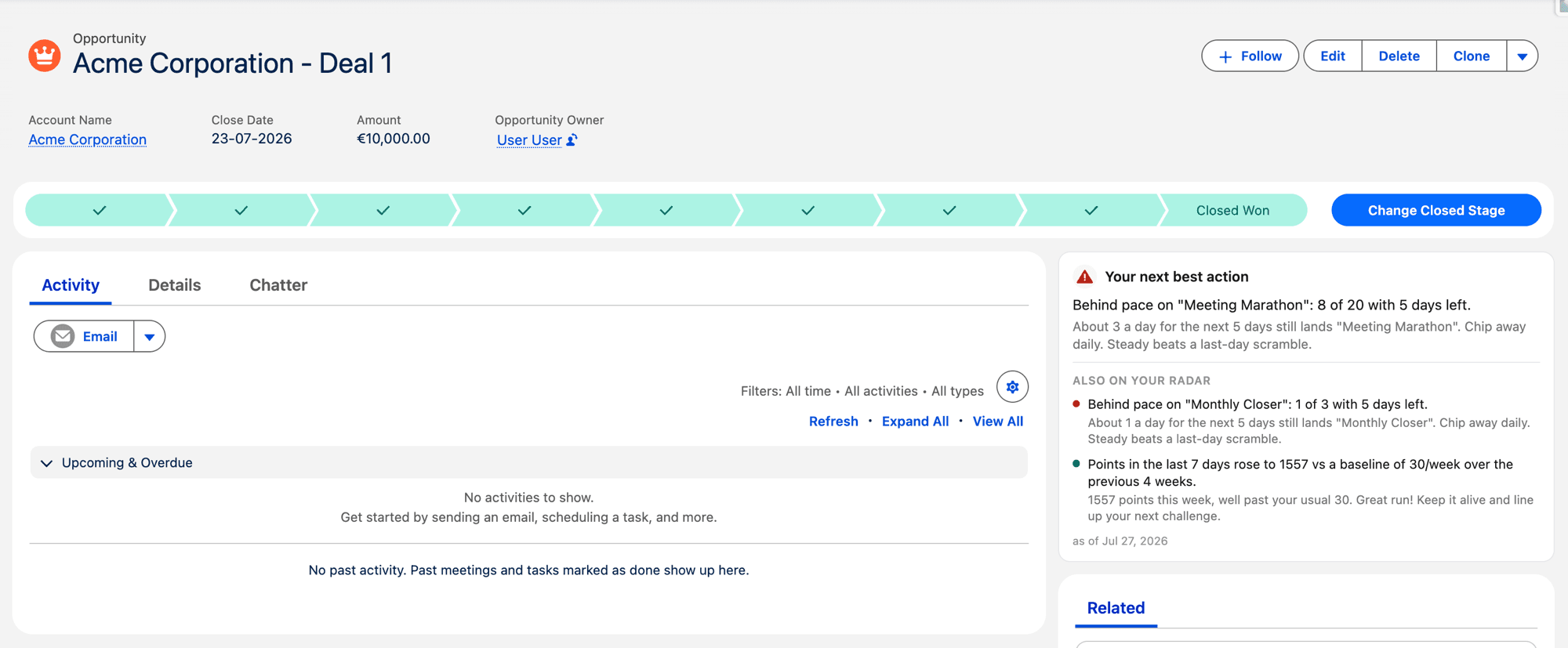
When there is nothing worth acting on, the card reads “Novigem coaching: you’re on track” and stays out of the way.
What a manager sees
Managers see the same signals per rep in Team Pulse, a tab that lists each direct report with:
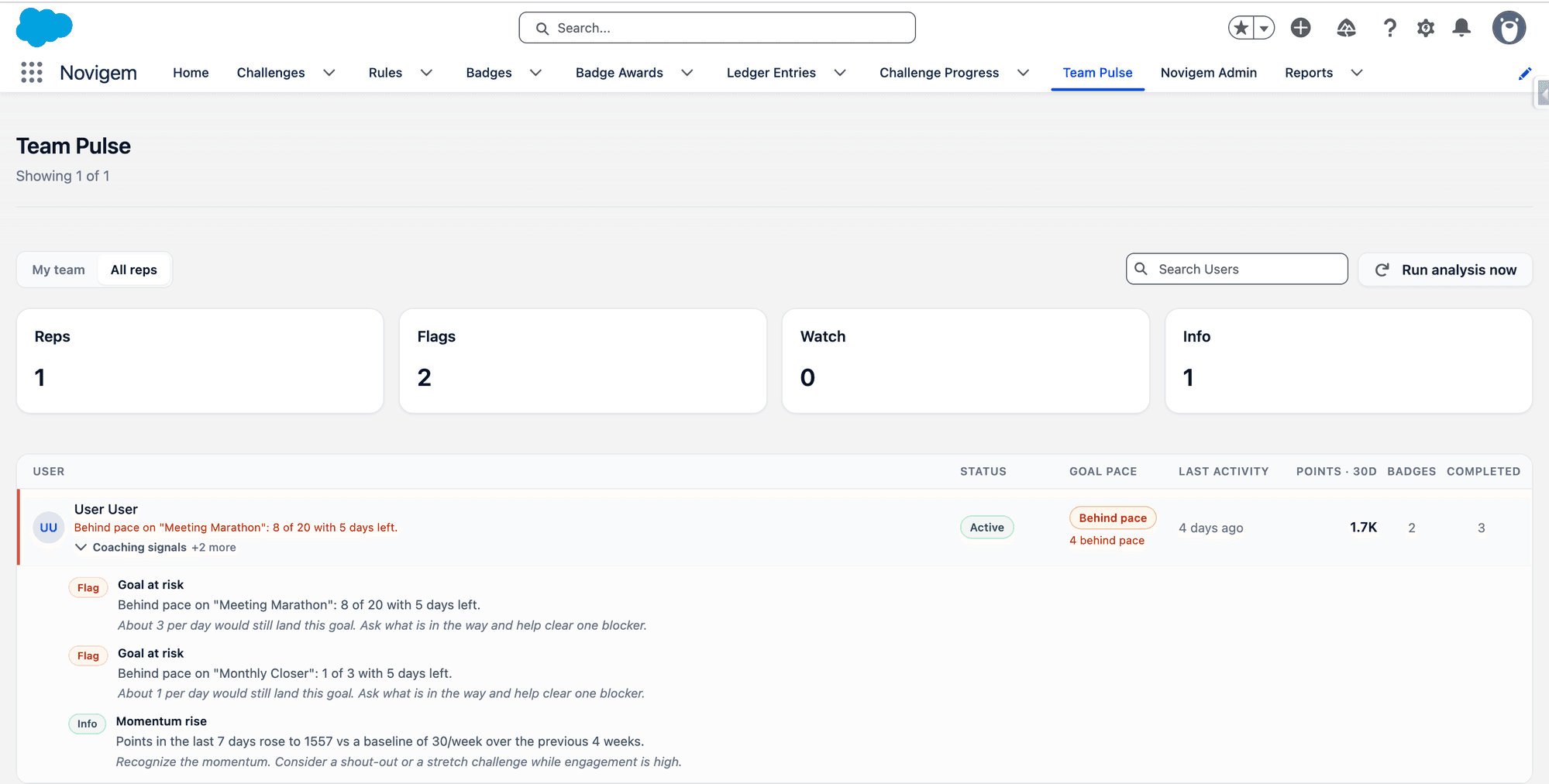
- Engagement status: Active, Cooling off, Gone quiet, or Not started
- Goal pace on time-boxed challenges
- Last activity
- Points, badges, and challenge completions
- Open coaching signals
People who need attention sort to the top. Team Pulse works out who reports to whom from the standard Manager field on the User record, and requires the Novigem Manager permission set, assigned in addition to Novigem User.
Signal lifecycle
Created
The nightly job writes a signal the first night a threshold is crossed.
Resolved
Signals resolve themselves automatically when the situation clears. Nobody has to tick anything off.
Purged
Resolved signals are deleted after 90 days, so the feed stays current.
Customising the wording
Novigem writes its own coaching copy. If your team uses different language, rewrite any of the six message types under Novigem Admin → Settings → General → Coaching messages. Only the wording changes; the thresholds stay the same.
Common pitfalls
- Leaving Nightly Maintenance unscheduled: the coaching card is silently empty forever
- Reading a signal as a verdict: it flags a change against the rep’s own history, not a performance rating
- Empty Manager fields on User records: managers open Team Pulse and see nobody
Related
- Progress tracking: where coaching, goal pace, and streaks show up for users
- Permission sets: the Novigem Manager set that grants Team Pulse
- Novigem and AI: what is rule-based today and what an AI layer would add
- Ledger, Challenges, Rules