Save Manager Time
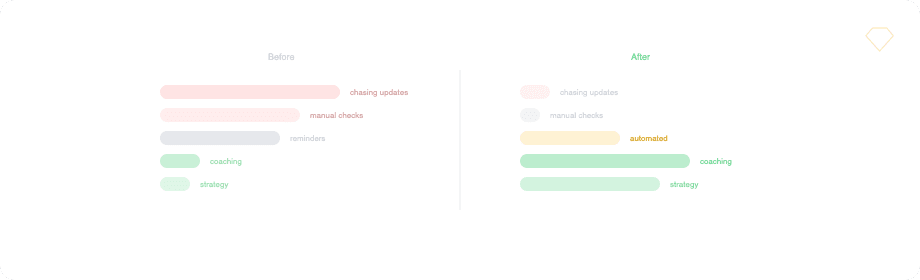
Sales and customer success managers often spend a significant portion of their time ensuring Salesforce data is complete and up to date. This limits time available for coaching, planning, and team development.
This playbook describes how Novigem reduces manual oversight by rewarding reps for meeting expected hygiene standards on their own.
Why Manager Time Gets Consumed
Common patterns across teams include:
- Manual checks for missing tasks, events, or fields
- Repeated reminders to log activity
- Inconsistent standards across managers
- Reactive clean-up before reviews or forecasts
These activities scale poorly as teams grow.
How Novigem Helps
Novigem shifts responsibility for hygiene from managers to the system itself.
By defining clear challenges and rules, Novigem:
- Rewards reps directly when they meet hygiene standards
- Reinforces expectations consistently across the team
- Gives managers a single Team Pulse view of engagement status, goal pace, last activity, and open coaching signals, with the people who need attention first
This allows managers to focus on coaching rather than data validation.
What This Program Focuses On
This program is designed to reinforce baseline Salesforce behaviors across the team.
Behaviors reinforced include:
- Logging tasks and events promptly
- Completing required fields consistently
- Keeping opportunity records current
- Maintaining accurate close dates and next steps
The focus is on prevention, not remediation.
Recommended 6-Week Configuration
Challenges
Weekly Record Hygiene A recurring challenge (weekly cadence) that awards points when reps keep their assigned records up to date. Use rules on Opportunity, Task, and Event objects to cover the key hygiene behaviors.
Tasks Logged Promptly Points are awarded for creating tasks with trigger type Create on the Task object. This rewards timely logging rather than batch entry at the end of the week.
Field Completeness
Points are awarded when reps update key fields on Opportunities. Use the isChanged operator, paired with isBlank set to false, to validate that fields like NextStep, CloseDate, and StageName are meaningfully filled in.
Leaderboards
- Individual leaderboard focused on consistency across hygiene behaviors
- Recurring resets keep the competition fresh each week
Badges
- Completion badge for reps who meet the weekly hygiene target
- Use completion bonus points for extra motivation
How to Set It Up
Each behavior maps to a rule on the relevant object.
| Behavior | Object | Trigger | Condition |
|---|---|---|---|
| Task logged | Task | Create | (all new tasks qualify) |
| Meeting logged | Event | Create | (all new events qualify) |
| Next step updated | Opportunity | Update | NextStep isChanged = true and isBlank = false |
| Close date updated | Opportunity | Update | CloseDate isChanged = true |
Tip: Keep point values modest (2-5 per action) to avoid inflating scores while still providing consistent feedback.
Give managers Team Pulse
- Assign the Novigem Manager permission set to each team lead, in addition to Novigem User, not instead of it. See Permission Sets.
- Populate the standard Manager field on each rep’s User record in Setup > Users. Team Pulse builds the team list from that field, so a blank field means an empty screen.
- Schedule Nightly Maintenance under Novigem Admin > Settings > Scheduled Jobs. Coaching signals are generated by that job.
How Managers Use This Program
Managers receive fewer interruptions and clearer insights:
- Team Pulse lists every direct report with engagement status, goal pace, last activity, and recent points, with the people who need attention sorted to the top
- Open coaching signals show why a rep is off track, so a 1:1 starts with a fact rather than a question
- Fewer manual reminders needed before pipeline reviews
- More time for coaching and strategy
Novigem enables managers to manage by exception rather than inspection.
Measuring Success After 6 Weeks
Teams often review:
- Reduction in manual follow-ups
- Time spent on Salesforce hygiene tasks
- Compliance rates across the team
- Manager satisfaction and focus
Use Challenge Impact in Novigem Admin to compare participants’ tracked activity before, during, and after the six weeks. It answers the two questions that matter: did the behaviour change, and did the change hold once the challenge ended.
Outcome
Managers reclaim time while data quality improves.
Novigem helps teams maintain Salesforce discipline without constant oversight.
Next steps
- Designing Effective Challenges: Principles that apply to all playbooks
- Improve Opportunity Stage Hygiene: Improve forecast accuracy
- Drive More First Meetings: Increase pipeline volume
- Rules: Configure hygiene rules