Rules Field Reference
This page documents all fields available when creating or editing a Rule in Novigem.
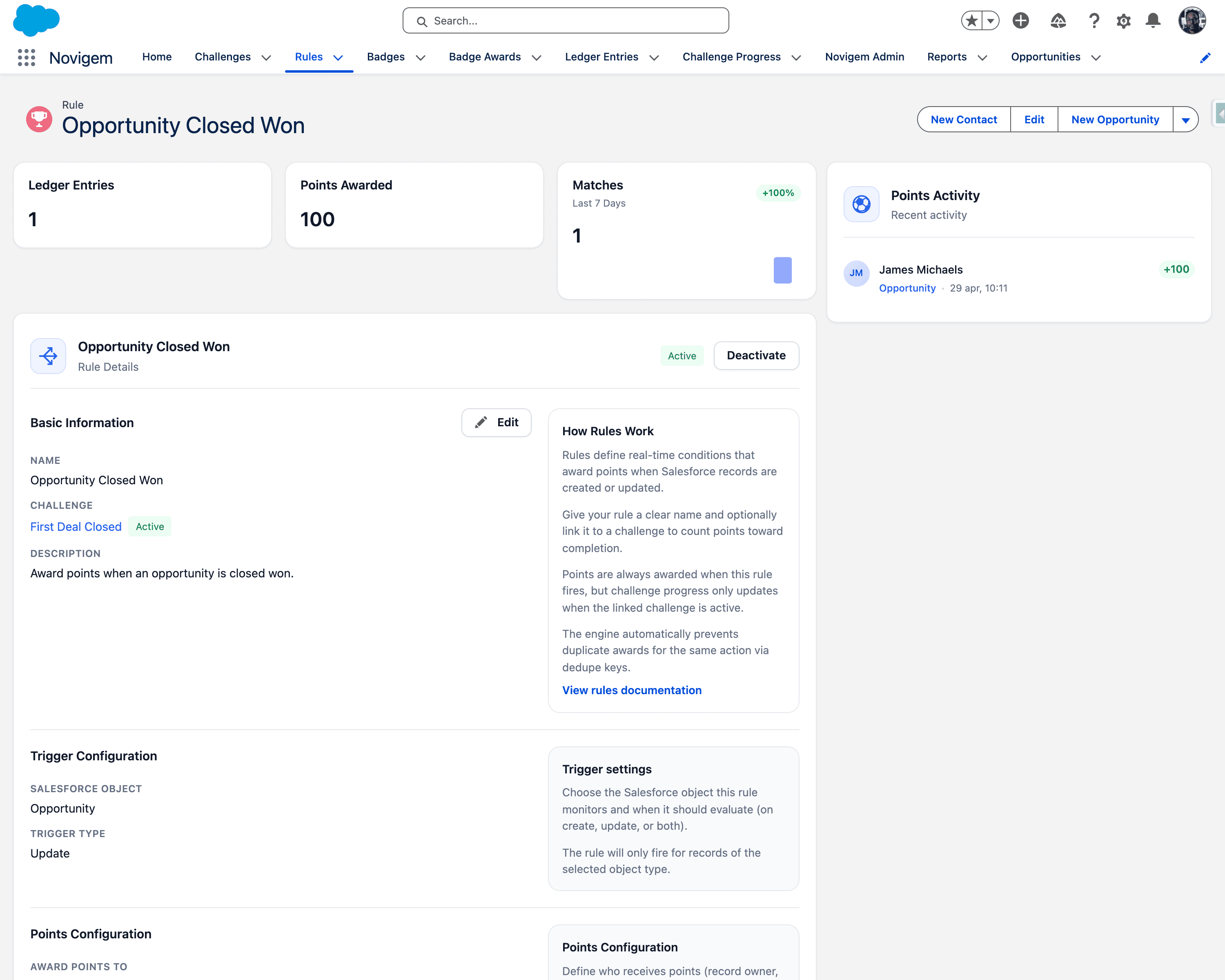
Basic Information
| Field | Description |
|---|---|
| Name | The display name of the rule. Use a clear, action-oriented name such as “New Lead Created” or “Quarterly Deal Closed”. |
| Challenge | The challenge this rule contributes progress toward. Each rule is linked to a single challenge. |
| Description | Explains what behavior this rule rewards. Example: “Award points for creating a new lead.” |
Trigger Configuration
| Field | Description |
|---|---|
| Salesforce Object | The object whose records trigger this rule. Lead, Opportunity, Task, and Event work out of the box via the packaged Apex triggers. Any other Salesforce object can be registered first under Novigem Admin > Settings > General > Tracked Objects > Add Object, and then also needs a record-triggered Flow. See Gamify a new object. |
| Trigger Type | When the rule fires: Create (new records) or Update (modified records). |
Always create and edit rules through the Rule Builder. The underlying field Rule__c.Salesforce_Object__c is a picklist that contains only the four built-in objects, so opening a rule from the standard record detail page or editing it inline from a list view can silently wipe a custom object’s value and stop the rule firing.
For task completion, use Trigger Type “Update” with a condition checking that Status equals “Completed”.
Points Configuration
| Field | Description |
|---|---|
| Award Points To | Who receives the points. See Actor Modes below for details. |
| Points | The number of points awarded when this rule matches. |
Actor Modes
The Award Points To field determines which user receives the points when a rule fires. Choose the mode that best matches the behavior you want to reward.
| Mode | Who Gets Points | Best For |
|---|---|---|
| Record Owner | The user in the record’s OwnerId field | Pipeline ownership, account management, lead follow-up |
| Last Modified By | The user who made the edit that triggered the rule | Data hygiene, field updates, collaborative record maintenance |
| Created By | The user who originally created the record | Prospecting, activity logging, lead generation |
Tip: Most rules should use Record Owner. Use Last Modified By when you want to reward the person who performed the action rather than the person who owns the record. Use Created By for activity-based rules like logging calls or creating tasks.
Record Owner reads the record’s OwnerId field. Some objects do not have one, master-detail children being the common case, and on those the rule matches but awards nothing. Use Created By or Last Modified By on objects without an owner.
Example scenarios:
- A manager reassigns a lead, then the new owner updates the status: Record Owner rewards the new owner; Last Modified By also rewards the new owner (they made the edit).
- An SDR creates a lead that is later converted by an AE: Created By rewards the SDR; Record Owner rewards whoever owns the lead at conversion time.
- Multiple reps update opportunity fields for data cleanup: Last Modified By rewards each person for their individual edits.
Conditions
The Conditions section defines which records qualify for points. Conditions are stored as JSON and filter on fields of the selected Salesforce Object.
An empty conditions array means all records of the selected object and trigger type will match:
{
  "conditions": []
}
The engine automatically prevents duplicate awards for the same action via dedupe keys. You don’t need to add conditions to prevent gaming.
Condition Structure
Each condition specifies a field, an operator, and a value:
{
  "conditions": [
    {
      "field": "StageName",
      "operator": "equals",
      "value": "Closed Won"
    }
  ]
}
Multiple conditions are evaluated with AND logic by default. All must be true for the rule to match:
{
  "conditions": [
    {
      "field": "StageName",
      "operator": "equals",
      "value": "Closed Won"
    },
    {
      "field": "Amount",
      "operator": "greaterThan",
      "value": "10000"
    }
  ]
}
Condition Groups (OR Logic)
To use OR logic, wrap conditions in groups. Each group is evaluated with AND internally, and groups are combined with OR:
{
  "logic": "OR",
  "groups": [
    {
      "conditions": [
        { "field": "StageName", "operator": "equals", "value": "Closed Won" }
      ]
    },
    {
      "conditions": [
        { "field": "StageName", "operator": "equals", "value": "Negotiation" },
        { "field": "Amount", "operator": "greaterOrEqual", "value": "50000" }
      ]
    }
  ]
}
This example matches opportunities that are either Closed Won or in Negotiation with an amount of $50,000+.
Relationship Fields
You can reference fields on related objects using dot notation:
{
  "conditions": [
    {
      "field": "Account.Industry",
      "operator": "equals",
      "value": "Technology"
    }
  ]
}
Operators Reference
The rule engine supports 11 operators for building conditions. The Rule Builder UI shows operators relevant to the selected field type automatically.
Comparison Operators
| Operator | Aliases | Description | Example Value | Works With |
|---|---|---|---|---|
equals | eq, = | Field value exactly matches | "Closed Won" | All field types |
notEquals | neq, != | Field value does not match | "Closed Lost" | All field types |
greaterThan | gt, > | Field value is greater than | "10000" | Number, Currency, Percent, Date |
lessThan | lt, < | Field value is less than | "5" | Number, Currency, Percent, Date |
greaterOrEqual | gte, >= | Field value is greater than or equal to | "100" | Number, Currency, Percent, Date |
lessOrEqual | lte, <= | Field value is less than or equal to | "50" | Number, Currency, Percent, Date |
Date values
Conditions on Date and Datetime fields take either a fixed ISO date ("2026-05-28") or a relative date token that is re-evaluated every time the rule runs:
{
  "field": "CloseDate",
  "operator": "greaterOrEqual",
  "value": "START_OF_QUARTER"
}
In the Rule Builder, select Use relative date on the condition row to enter a token instead of picking a calendar date. See Date Tokens for the full list, range patterns, and Salesforce report filter equivalents.
Text Operators
| Operator | Description | Example Value | Works With |
|---|---|---|---|
contains | Field value contains the substring | "renewal" | Text, Text Area, Email, Phone, URL |
startsWith | Field value starts with the string | "ACME" | Text, Text Area, Email, Phone, URL |
endsWith | Field value ends with the string | "Corp" | Text, Text Area, Email, Phone, URL |
Blank checks
| Operator | Description | Example Value | Works With |
|---|---|---|---|
isBlank | Check whether a field is blank or not | "true" to match blank, "false" to match non-blank | All field types |
isBlank uses a boolean string value. Set it to "true" to match fields with no value, or "false" to match fields that have a value.
Change detection
| Operator | Description | Example Value | Works With |
|---|---|---|---|
isChanged | Field value changed from its previous value | "true" (default if omitted) | Update trigger only |
isChanged compares the field’s old and new values within an Update trigger. If the value is omitted, it defaults to true. Set it to "false" to match when the field did not change.
isChanged only works with Update trigger type. On Create triggers there is no old value, so this operator is meaningless there.
Example · Award points when the stage field changes (any change):
{
  "conditions": [
    {
      "field": "StageName",
      "operator": "isChanged",
      "value": "true"
    }
  ]
}
Example · Award points when stage changes to Closed Won:
Combine isChanged with equals to detect a specific change:
{
  "conditions": [
    {
      "field": "StageName",
      "operator": "isChanged",
      "value": "true"
    },
    {
      "field": "StageName",
      "operator": "equals",
      "value": "Closed Won"
    }
  ]
}
Example · Award points when a previously blank field gets filled in:
{
  "conditions": [
    {
      "field": "NextStep",
      "operator": "isChanged",
      "value": "true"
    },
    {
      "field": "NextStep",
      "operator": "isBlank",
      "value": "false"
    }
  ]
}
Rule Status
Rules can be set to:
| Status | Description |
|---|---|
| Active | The rule is evaluating and awarding points. |
| Deactivate | The rule is ignored and never awards points. |
Common Rule Patterns
Award points for creating leads
- Salesforce Object: Lead
- Trigger Type: Create
- Award Points To: Record Owner
Award points for closing deals
- Salesforce Object: Opportunity
- Trigger Type: Update
- Conditions:
StageNameisChanged=trueANDStageNameequals"Closed Won"
Award points for completing tasks
- Salesforce Object: Task
- Trigger Type: Update
- Conditions:
Statusequals"Completed"
Award points for logging meetings
- Salesforce Object: Event
- Trigger Type: Create
Award points for high-value closed deals
- Salesforce Object: Opportunity
- Trigger Type: Update
- Conditions:
StageNameisChanged=trueANDStageNameequals"Closed Won"ANDAmountgreaterOrEqual"50000"
Award points for updating next steps
- Salesforce Object: Opportunity
- Trigger Type: Update
- Conditions:
NextStepisChanged=true
Award points on a custom object
- Salesforce Object: the registered custom object, for example
Site_Visit__c - Trigger Type: Create
- Award Points To: Record Owner, or Created By if the object has no
OwnerId - Prerequisites: the object is registered under Novigem Admin > Settings > General > Tracked Objects, and a record-triggered Flow on that object calls the invocable action Evaluate Record with Novigem (category Novigem) with Record =
{!$Record}and Prior Record ={!$Record__Prior}. Without the Flow the rule never fires, because the packaged Apex triggers only cover Opportunity, Lead, Task, and Event. - Create and edit this rule in the Rule Builder only, see the picklist warning above.
Best Practices
- Use descriptive names that explain the behavior being rewarded
- Deactivate rules while configuring, then activate when ready
- Choose the appropriate Actor Mode for your use case (usually Record Owner)
- Test rules in a sandbox before activating in production
- Combine
isChangedwithequalsfor stage-based rules to prevent points on repeated saves without actual changes - Combine conditions to be specific: broad rules create noise
- Never edit a rule from the record detail page or a list view, use the Rule Builder
Next Steps
- Gamify a new object: register any Salesforce object and wire up the Flow
- Date Tokens: relative date values for conditions on Date and Datetime fields
- Core Concepts: Rules
- Challenges Field Reference
- Ledger Field Reference
- Glossary: Definitions for terms like Operator, Condition Group, Dedupe Key