Changelog / Release Notes
This page contains the release notes for any Novigem release. You can always upgrade to the latest version via https://novigem.com/install .
If administrator actions are required to make a newer version work, this will be clearly displayed in the corresponding release note.
Novigem 1.12
Reward habits with streak challenges, put your own artwork on badges, and build challenges in plain words. Two things for admins to check if you want streaks or custom badge images, see For admins.
New features
- Streak challenges. Reward a habit, not just a total. Set a challenge like “log a meeting every day for 5 days” or “submit your timesheet 6 weeks in a row”. Novigem tracks each person’s run, starts it over when they miss a day or week, and pays the bonus and badge the first time they reach the goal. Each rep sees their run on their challenge card, one marker per day or week, so they know what to do today to keep it going. In the Challenge builder, set Goal Metric to Streak and pick days or weeks. Works on One-time and Timebound challenges. A new Timesheet streak template in the Challenge Library gets you started if you use Field Service timesheets. See Streak challenges.
- Badges that look like your team. Admins can upload a PNG or JPG for any badge instead of the standard coloured icon, so badges can carry your team names, campaign art or in-jokes. The artwork shows everywhere the badge does, including the celebration when someone earns it and the Chatter post that announces it. Off until an admin turns it on. See Custom Badge Images.
- A Challenge builder that reads like plain English. Every choice now comes with a short explanation and an example, like “Example: log 20 calls” or “Example: close €50,000 in March”. Warnings tell you what to do next instead of only what went wrong. A few captions changed: Goal Configuration is now Goal, and Cadence is now Repeats (How often it repeats while editing). For a Sum goal, Object to sum now lists every registered object, not only those that already have a rule. An object without a rule yet shows “(no rules yet)”. See Challenges builder.
- See at a glance that your setup is connected. In General Settings, each tracked object now shows an Automation badge: Novigem trigger, Flow found, No automation found or Not checked. Spot an object that will never give points before your team notices. Flow found means an active Flow exists on the object, not that it calls Novigem. See Automation status.
Improvements and fixes
- Easier to use with a screen reader or keyboard. Admin toggles have proper names for screen readers. The challenge celebration is announced, and the confetti is left out when your device is set to reduce motion. The leaderboard and podium mark your own row with “(you)” for screen readers, instead of relying on colour. The Award Badge dialog closes with Escape and puts you back where you were. Focus outlines are clearer on the object picker, the clear button and the admin menu, and some green and grey text is darker so it is easier to read.
- Team Pulse shows who is really active. A quiet rep no longer shows as active just because they completed a challenge with no bonus or badge. Last activity now reflects points they actually earned.
- Coaching signals keep running. The nightly coaching signals no longer fail for a group of people when someone has two progress records on the same challenge. That could happen after a Recurring challenge was changed to Timebound.
- Sum progress never goes below 0. On a Sum challenge for a number that can be negative, like refunds or discounts, progress now stops at 0.
- Safer points deductions. For someone with a very long points history, a deduction no longer risks failing the whole record save. If Novigem cannot check the balance, it skips the deduction with “This user’s points balance could not be verified. The deduction was not applied.” This only applies when negative balances are not allowed, which is the default.
- Rules saved outside the Rule Builder are checked too. Rules created by a data import or an integration now get the same checks as the Rule Builder. A misspelled relative date, or text in a greater than or less than comparison, is refused with the same message the builder shows.
- Clear errors on Team Pulse. The suggested challenges card says “Couldn’t load suggested challenges.” when it fails, instead of looking empty. Run analysis now shows a clear message when Salesforce is too busy to start it.
- Activity lists no longer go blank. On rule, challenge and badge pages, an activity list with Max Items set to 0 or left empty in App Builder now shows 10 items.
- My Points filters stay clean. Clicking Load more and then changing a filter no longer mixes old results into the new list.
- Novigem Agentforce on the Integrations page. Settings > Integrations now has a Novigem Agentforce tile that shows whether the separate extension is installed, with an install link if it is not. Novigem itself adds no agent features. See Agentforce Actions.
For admins
- Streaks need the nightly job. A missed day or week is only picked up by the Novigem Daily Job. Check that it is scheduled under Novigem Admin > Settings > Scheduled Jobs, and that Enable Rule Engine is on. For daily streaks, run it every day, weekends included. See Scheduled Jobs.
- Custom badge images are off by default. Turn on Allow Custom Badge Images under Settings > Badge Style. Uploads need Content Distribution switched on in Salesforce Setup (Content Deliveries and Public Links). Each image gets a public link that anyone can open without signing in, so do not upload anything confidential.
- The Automation badge needs access to Flows. If your user cannot view Flows, every registered object shows Not checked. Apex triggers your own team wrote are not detected.
- Challenge progress records can no longer be deleted, by anyone, admins included. This protects completion history.
- Timesheet streak template. It shows as unavailable until your org has Field Service timesheets and Time Sheet is registered as a tracked object.
- Permissions update on upgrade. Novigem Admin gets edit access, and Novigem User read access, to the new badge image fields. Nothing to assign.
Novigem 1.11.0
Rules that compare one field with another, so a target can live on the record instead of in the rule. Plus fixes for battles and for orgs with a long history. No admin actions.
New features
- Field-to-field conditions. A condition can now compare a field with another field on the same record, instead of only with a typed value. Hours written at least the contracted hours, or an amount above the target stored on the same record. In the Rule Builder, pick an equality or comparison operator and click Compare to a field: the value becomes a picker of compatible fields. Numbers compare with numbers and dates with dates; text, picklist, checkbox and lookup fields support equals and not equals. If either field is blank the condition is false, so a missing target never earns points. Formula fields are offered too, so when each person’s target lives on another object, bring it onto the record with a cross-object formula and compare against that. The Rule Simulator shows the compared field and its current value.
Bug fixes
- Reps can load battle scores. Since 1.9, reps saw “Failed to load this battle’s scores” on their battle cards, and only admins could see the score. Reps now see the live score of every battle they are on, and still nothing of battles they are not on.
- Nightly jobs and Team Pulse keep working as the ledger grows. Once an org built up a long points history, the nightly coaching jobs and the Team Pulse all-reps view could fail with a query error. Participants are now looked up in a way that does not grow with the ledger.
- Ledger tabs no longer hide each other. On a challenge’s ledger, an error loading the Activity tab no longer replaces the Participants list that had already loaded, and the other way round.
- Keyboard access on badges. The linked challenges on a Badge record page can now be reached and opened with the keyboard and a screen reader.
Admin actions
None. Upgrade and everything keeps working as before. Existing rules evaluate exactly as they did.
Novigem Agentforce 0.1
A separate extension package that lets people talk to Novigem through Agentforce. An admin describes what to reward and the agent creates the rule or challenge. A rep asks how they are doing or what to work on next. A manager asks how their team is doing. See Agentforce Actions for every action, example prompts and setup.
What it adds
- Seven agent actions in two topics. Novigem Setup creates rules and challenges, lists what Novigem can score, and suggests challenges. Novigem Coaching gives coaching tips, your own points and rank, and a team overview for managers.
- Guards against broken setup. A rule or challenge with no condition is refused unless you say every record should count, and a challenge always needs a rule to feed it. The three write actions ask for confirmation before they run.
- Answers about yourself only. The read actions answer for the person asking. The team overview needs Novigem Manager or Novigem Admin, covers your own direct reports, and names only the people who need attention.
Admin actions
- Agentforce has to be turned on in the org, and Novigem 1.10.0 or later installed first.
- Install the extension: install link .
- Assign the Novigem Agentforce permission set next to each user’s Novigem permission set, then add the Novigem Setup and Novigem Coaching topics to an agent of your own.
Novigem 1.10.0
See why a rule did or did not award, before it costs anyone points. Rules that can tell a real note from a padded one. Plus the usual round of fixes and hardening from ongoing review. No admin actions.
New features
- Rule Simulator. Pick a record and a user, and the admin console shows you exactly what the engine would decide, in the order it decides it: the kill switch, the object switch, that user’s licence, which rules match the object and trigger, and then per rule every condition with its actual value next to the expected one, the resolved actor and why that person, the governing team, and the points. It stops at the first thing that blocks an award and tells you what that was. Read-only, so nothing is written and no points are awarded by running it.
- Character count and word count conditions. Three new condition operators:
lengthgreaterorequal,lengthlessorequal, andwordcountgreaterorequal. A rule can now require that a note is a real note rather than a character.isblank = falseis satisfied by a single letter;lengthgreaterorequal 100is not. Character and word counts fail in opposite directions, so requiring both closes each other’s gap: a long run of padding passes a character count and fails a word count, and a handful of single letters does the reverse.
For extension package authors
Wrapper contents are now reachable from another package in the ngm namespace through toJsonInternal(). @AuraEnabled and @NamespaceAccessible cannot be combined on the same member, so there was no annotation that opened these fields up. Seven methods gained the helper, no signatures changed.
Admin actions
None. Upgrade and everything keeps working as before.
Novigem Wallboard 1.0
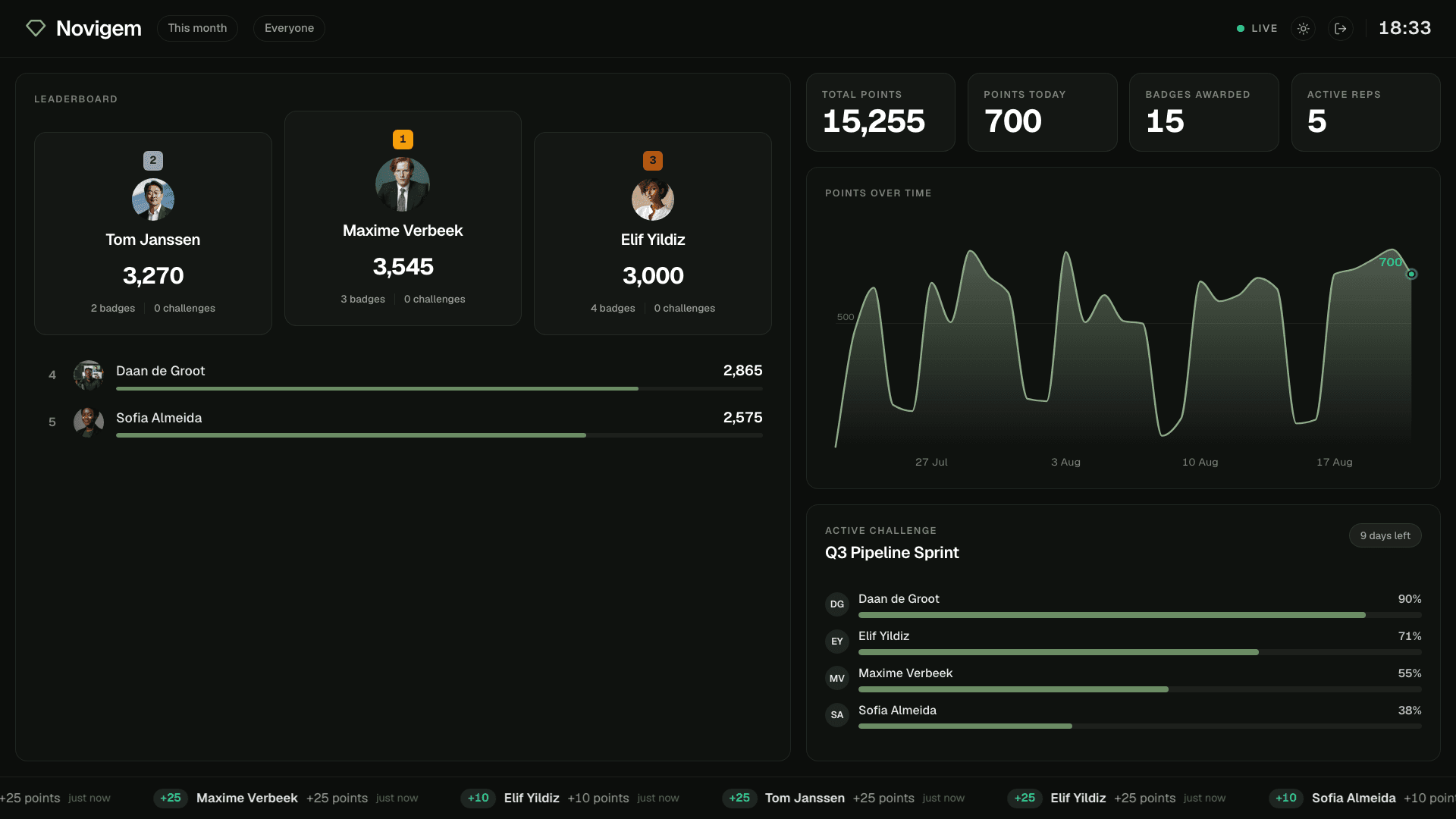
A new product alongside the package: put your leaderboard on a TV. Live points, badges, the active challenge, and a confetti celebration within seconds of a badge being earned. Runs at dashboard.novigem.com .
How it works
- Your login, your data. Every screen signs in with its own Salesforce account. The board queries as that user, so sharing rules apply and nothing is stored on our side. Signing out revokes the login at Salesforce.
- Live. Awards appear on the board within seconds through a per-screen event subscription, with a 30 second refresh as fallback.
- Configurable per screen. A settings page composes the board: theme, period, team, widget arrangement by dragging them in a live preview, and colors. The result travels in the screen’s URL or is remembered on that device, so two screens in one org can show different boards. Period, team, and theme can also be switched straight from the header. See the Wallboard guide.
Admin actions
- Install the Wallboard Connector package in your org before users sign in. It contains one OAuth app definition and nothing else: install link . Novigem 1.8 or later recommended. The connector carries the Novigem app icon, so users see the logo rather than a blank placeholder on the sign-in approval screen and in the connected apps list.
Novigem 1.9.0
A starter library so a fresh install is not an empty page, head-to-head battles, rules that compare dates without hardcoding them, and team scoping. One admin action, and only if you want to use teams.
New features
- Challenge Library. Twelve ready-made starter templates: challenges, their rules, and badges, installed in one click from the admin app. Everything arrives inert, challenges as Draft and rules inactive, so nothing awards a point until you have opened it in the builder and switched it on.
- Head-to-head battles. Put two people, or two teams, against each other on a rule you already run. Both sides see a live score, and a winner is declared at the end date. Team battles score either the average per member or the team total, so a big team does not win on headcount alone.
- Relative dates in rule conditions. Compare a date field against
TODAY,YESTERDAY,N_DAYS_AGO:30, or a period boundary likeSTART_OF_QUARTERandEND_OF_MONTH, with offsets. A rule keeps working without anyone editing it, instead of going stale the way a fixed date does. - A date editor that works like the report builder. Date fields in the rule builder now have a calendar and relative toggle, rather than asking you to type a token.
- Team scoping. Limit a challenge, rule, or leaderboard to one team instead of the whole org. Sales and Customer Success can run different challenges, and each team sees its own leaderboard. When a rule is linked to a challenge, the challenge’s team applies.
- Challenge completion posts to Chatter. Optional, alongside the existing notifications.
Improvements
- Only licensed users earn points. Points are awarded to the person a record belongs to, so someone without a Novigem licence could previously end up on the leaderboard because a colleague touched their record. They no longer do.
- Expired Timebound challenges no longer read as active. When the end date passes, the challenge ends automatically: it stops awarding points, no longer counts as active on the admin dashboard, and no longer appears in Team Pulse or raises behind-pace flags.
- Run Now on the Scheduled Jobs screen runs the full nightly job, including coaching signals. It previously reset recurring challenges only.
- Rep coaching messages rewritten in plain language, leading with the action.
- The admin console remembers which section you were on across a refresh.
Bug fixes
Fixes across the rule builder, the coaching feed, and the admin console, including more reliable point awards when a challenge is completed.
Admin actions
- Check any rule that scores queue-owned records. Records owned by a queue rather than a person are now skipped, because a queue holds no licence and there is nobody to award. If you score Leads or Cases before they are assigned, those rules stop awarding on unassigned records.
- Only if you want teams. Go to Novigem Admin → Settings → General → Teams and switch teams on. Every Public Group is selected by default, so remove the ones that have nothing to do with Novigem. Leave teams off and everything stays org-wide exactly as before.
Novigem 1.8.0
Coaching and extensibility release. Two admin actions are required to get everything working (see below).
New features
- Gamify any Salesforce object. Rules and challenges are no longer limited to Opportunity, Lead, Task, and Event. Register any object from Novigem Admin → Settings → General, then feed record saves into the engine with a record-triggered Flow. See Gamify a new object.
- Evaluate Record with Novigem, a new Flow action. Call it from a record-triggered Flow on any registered object to award points and challenge progress. No Apex required.
- Coaching feed for reps. A card on the rep home page shows the single most useful thing to do next, written in plain language with the rep’s own numbers. It stays quiet when there is nothing worth acting on.
- Goal pace on challenges. Every time-boxed challenge now shows whether a rep is ahead, on track, or behind, plus the daily rate needed to still finish on time.
- Team Pulse, a new tab for managers. One screen showing every team member’s engagement status, goal pace, last activity, and recent points, with the people who need attention sorted to the top.
- Suggested challenges. When most of the team earns points from a behaviour that some reps never touch, Novigem proposes a two-week challenge to close that gap. One click creates it.
- Challenge Impact. Compare participants’ tracked activity before, during, and after a challenge, so you can see whether it changed behaviour and whether the change held.
- Streaks and personal bests. Reps see daily and weekly activity streaks, best day, and best week alongside the leaderboard. Optional bonus points at streak milestones.
- Custom coaching messages. Novigem writes its own coaching copy. Admins who want their own wording can rewrite any of the six message types under Settings → General → Coaching messages.
Improvements
- Tracked objects now have their own card in General Settings, separate from the engine kill switches, with a per-object toggle.
- The default leaderboard timeframe is now configurable.
- The empty rules state on a challenge now links straight to rule creation.
Bug fixes
- Large point totals now round correctly. Values no longer display as 1000.0K instead of 1.0M.
- Cancelling an edit in the rule builder no longer leaves a spinner running.
- The admin overview now reports an error when its statistics fail to load, instead of failing silently.
- The rule and challenge builders no longer fail silently when a record loads read-only.
Admin actions
- Schedule the nightly job. Coaching signals, streak milestones, and recurring challenge resets all run from it. Go to Novigem Admin → Settings → Scheduled Jobs, then schedule Nightly Maintenance. Until this is scheduled, no coaching signals are generated. Note that the Run Now button on that screen only resets recurring challenges. To generate signals on demand, use Run analysis now on Team Pulse.
- Assign the Novigem Manager permission set to anyone who should see Team Pulse. Assign it in addition to Novigem User, not instead of it. Team Pulse uses the standard Manager field on the User record to work out who reports to whom.
Novigem 1.7.0
Reporting and security release. No admin actions required to upgrade.
New features
- Custom report types for native Salesforce reporting on points, badges, and challenge progress. Build your own reports and dashboards on Novigem data with the standard report builder.
Bug fixes
- Point totals and other metrics now show a zero value instead of hiding the field entirely.
- Users assigned a Novigem permission set but no package license are now skipped during rule evaluation, instead of causing an error.
Security
- Consolidated hardening from the latest round of AppExchange Security Review audits, including tighter access control on internal engine, controller, and Lightning component methods, and reduced personal data read by internal queries.
Novigem 1.6.0
Access and security release. One admin action is recommended after upgrade (see below).
Improvements
- Non-admin users who open the rule, challenge, or badge builder now see a clear “admin access required” message instead of a blank screen.
Bug fixes
- Users with the Novigem User permission set no longer hit “insufficient access” errors when saving Opportunities, Leads, Tasks, or Events, or when points are awarded. The permission set now includes the Apex access and the platform event permission the engine needs.
Security
- The rule, challenge, and badge builders, the points ledger admin view, and the badge activity panel now require the Novigem Admin permission. The admin-only object and field lookups in the rule builder are gated the same way.
- Removed a user email field from an internal badge query that never needed it, reducing the personal data the package reads.
- Further Apex and Lightning hardening ahead of the AppExchange Security Review.
Admin actions
- The builders now require the Novigem Admin permission set. After upgrading, confirm that everyone who creates or edits rules, challenges, or badges is assigned Novigem Admin.
Novigem 1.5.0
Security and stability release. No admin actions required to upgrade.
Security
- Badge icons are now restricted to same-origin Salesforce static resources. Badge images can no longer be loaded from external URLs.
- Additional Apex and Lightning component hardening ahead of the AppExchange Security Review, including tighter access control on internal settings methods.
Bug fixes
- More reliable settings deployment. Settings are now namespace-qualified and no longer assert on values that can change, preventing setup errors in some orgs.
Novigem 1.4.0
Bug fix release. No admin actions required to upgrade.
Bug fixes
- Users without Novigem access no longer hit an error when saving Opportunities, Leads, Tasks, or Events. The rule engine now skips users who do not have a Novigem permission set assigned, instead of throwing an exception.
Novigem 1.3.0
Security and bug fix release. No admin actions required to upgrade.
Bug fixes
- Badge icon color now persists correctly when editing an existing badge
- Sample badge awards now route through the standard BadgeService, fixing inconsistencies between manually-created and sample-generated awards
Security
- Additional defence-in-depth hardening
Novigem 1.2.0
Maintenance release. No admin actions required to upgrade. No user-visible changes. This version contains internal preparation work for the next AppExchange Security Review submission.
Novigem 1.1.0
Security hardening release. No admin actions required to upgrade.
Security
- Points, badges, and challenge progress can no longer be written directly to Salesforce, Novigem now enforces this at the database level
- Only admins can modify challenge completion dates, preventing users from backdating their own progress
- Configuration change log entries cannot be edited or deleted after the fact
- Manual badge awards are rate-limited per hour to prevent abuse
Bug fixes
- Leaderboard rank no longer exceeds the total number of participants at the boundary
- Points sparkline on the My Points component now shows data in the user’s local timezone, not UTC
- Leaderboard shows initials when a user’s profile photo fails to load
- Rules with large condition groups no longer fail in high-volume transactions
Novigem 1.0.1
Maintenance release. No admin actions required to upgrade.
Bug fixes
- ConditionEvaluator: Internal error messages are no longer exposed in exception output. Error handling is now properly contained.
- Lightning components: Replaced selectors that violated Shadow DOM encapsulation. Components are now fully compliant with Salesforce’s LWC security model and less likely to break on platform updates.
Improvements
- Chatter notifications: Added error observability to the notification queueable. Uncaught exceptions during badge award notifications are now logged rather than silently lost.
Novigem 1.0 · General Availability
What’s in 1.0
- Rule Engine: real-time point awards on Opportunity, Lead, Task, and Event activity, with full AND/OR condition logic, 11 operators, relationship field support, and deduplication
- Challenges: One-time, Timebound, and Recurring challenge types with progress tracking, completion bonuses, and badge rewards
- Badges: manual and automatic badge awards, five icon colors (gold, silver, bronze, ruby, emerald), three shapes (hexagon, circle, shield)
- Leaderboard: all-time, weekly, monthly, and quarterly period filters with dense ranking and podium view
- Ledger: append-only, immutable point history with full Salesforce reporting support
- Celebrations: real-time in-app celebration component powered by Platform Events. Place the Novigem Challenge Celebration component on your Opportunity record page and Salesforce Home page
- Notifications: Chatter (in-app) notifications for badge awards
- Admin Console: general settings, badge style, notifications, scheduled jobs, and configuration audit log
- Scheduled Jobs: automated recurring challenge resets with configurable cron expressions
Curious what’s coming next? See the Novigem Roadmap for what’s in progress and planned.