Challenges Field Reference
This page documents all fields available when creating or editing a Challenge in Novigem.
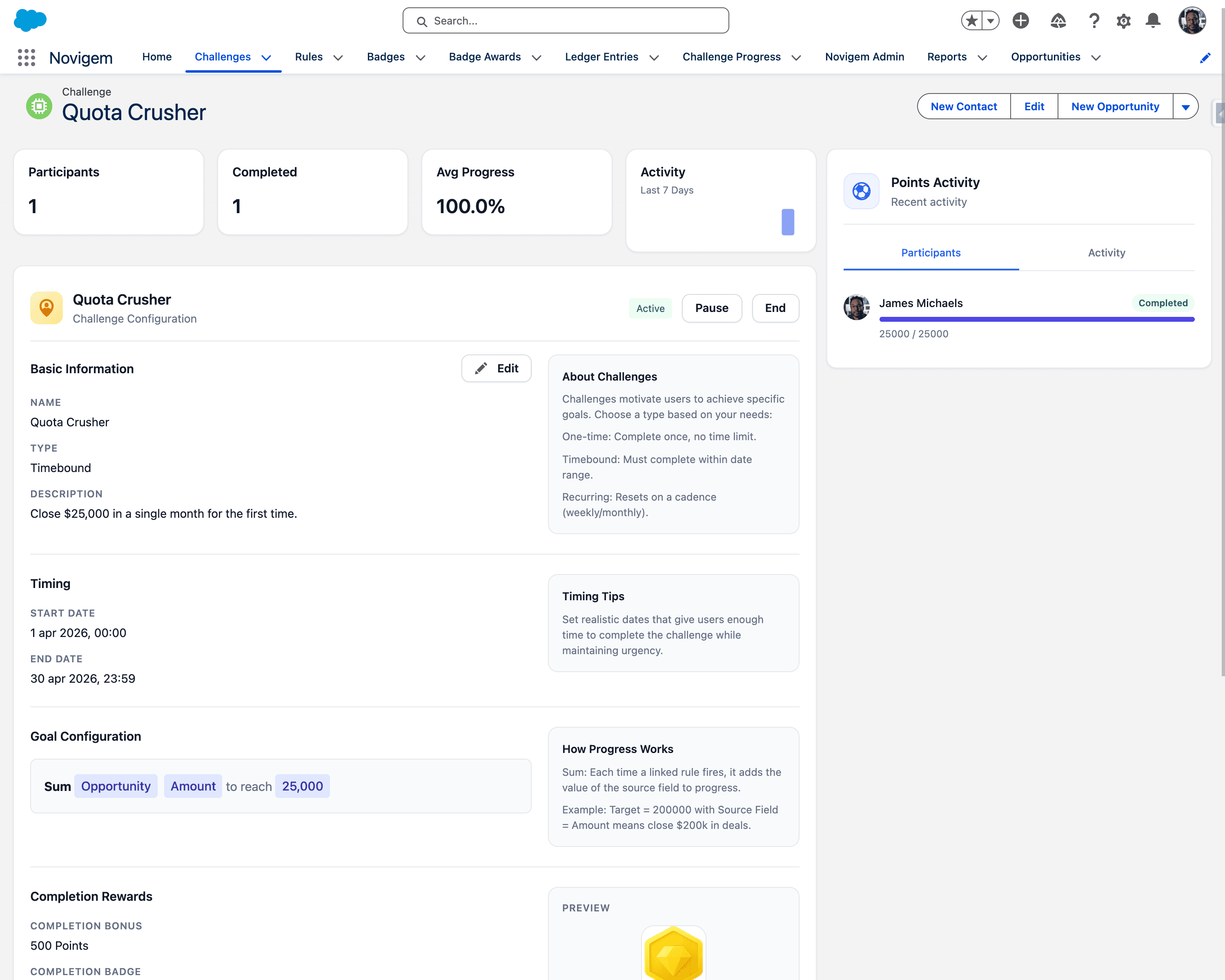
Basic Information
| Field | Description |
|---|---|
| Name | The display name of the challenge shown throughout the user interface. Use a short, motivating title such as “Big Quarter” or “Lead Machine”. |
| Type | The timing behavior of the challenge: One-time (complete once, no time limit), Timebound (must complete within date range), Recurring (resets on a cadence), Head-to-head (person vs person) (two people duel on points), or Head-to-head (team vs team) (two Public Groups duel on points). The two head-to-head types decide whether the sides are people or teams, so the sides can never be mismatched. |
| Description | A brief explanation of what participants should do to complete the challenge. Example: “Close $75,000 in deals this quarter.” |
| Applies to | Who takes part. Organisation wide is the default and means everyone. Choosing a team narrows it to the members of one Salesforce Public Group. The picker only offers groups added on the Teams card in Novigem Admin > Settings > General, and the whole control is hidden until at least one is, see Who takes part. |
Timing
Required for Timebound challenges:
| Field | Description |
|---|---|
| Start Date | When the challenge starts tracking progress. |
| End Date | When the challenge stops tracking progress. Must be later than Start Date. When the end date passes, the challenge ends automatically: it stops awarding points from that moment, no longer counts as active on the admin dashboard, and no longer appears in Team Pulse or raises behind-pace flags. |
For Recurring challenges, progress resets automatically based on the cadence (weekly, monthly, quarterly).
Recurring resets are done by the Novigem nightly job. If that job is not scheduled, a recurring challenge never resets and keeps accumulating against the same period. Check the schedule before assuming the cadence is misconfigured.
Battle Configuration
These fields only appear when the Type is one of the two head-to-head values. A battle has no goal metric or target: the winner is whoever holds the higher score when the end date passes.
| Field | Description |
|---|---|
| Participant one / Participant two | Person battles only. The two people who compete, chosen with a people picker. |
| Team one / Team two | Team battles only. The two Public Groups that compete. The pickers offer the teams curated on the Teams card in Novigem Admin > Settings > General, and stay empty until at least one group is added there. The builder shows a hint pointing at that card when no teams are set up yet. |
| Scoring Mode | Which ledger entries count toward the battle score. Linked rules only (the default) counts points from rules linked to this battle. All points earned counts every point either side earns between the start and end date, whatever earned it. |
| Team scoring | Team battles only. How member points combine into a side score. Average per member (the default) divides the side’s total by its active member count, so teams of different sizes compete fairly. Total points adds every member’s points, which favours the bigger team; the builder warns you when the two teams are different sizes. |
Validation
Both sides must match the challenge type: a person battle holds two people and a team battle holds two teams, never a mix. The two sides must also be different, and the battle needs a start date and an end date after it. A save that breaks any of these is rejected with “A battle needs two different sides matching its type, a person battle two people and a team battle two teams, plus a start date and an end date after the start.”
Team membership is resolved at scoring time. Someone who joins a team mid-battle contributes their points from the whole battle window, and someone who leaves stops contributing entirely. See Head-to-head battles.
Goal Configuration
Define how progress is measured:
| Field | Description |
|---|---|
| Metric | Choose Sum to add field values, or Count to count matching records. |
| Object | The Salesforce object to track. Opportunity, Lead, Task, and Event work out of the box. Any other Salesforce object can be used once it is registered under Novigem Admin > Settings > General > Tracked Objects, see Gamify a new object. |
| Field | The numeric field to sum when using Sum metric (e.g., Amount). |
| Target | The goal value participants must reach to complete the challenge. |
Example: “Sum | Opportunity | Amount | to reach 75,000” means participants must close $75,000 in Opportunity Amount.
Goal pace
Challenges that have both a start date and an end date show participants a pace chip in My Challenges, so a rep sees whether they are on track for the deadline rather than only how far along they are.
There are exactly three states:
| Chip | Meaning |
|---|---|
| Ahead of pace | Progress is running above the pace needed for the window. |
| On track | Progress is within the tolerance band around the expected pace. |
| Behind pace | Progress is below the pace needed to finish in time. |
A tolerance band of one tenth of the target around the expected pace keeps reps from flipping between states on a single quiet day.
Under Behind pace only, a detail line shows the catch-up rate, for example “Need 4/day to finish”. That line is part of the Behind pace state, not a fourth chip.
The pace chip does not appear on a completed challenge, on a challenge without a valid start and end window, or when the target is zero or negative.
Completion Rewards
| Field | Description |
|---|---|
| Completion Bonus | Bonus points awarded once when a participant completes the challenge. |
| Completion Badge | The badge awarded to participants when they complete the challenge. Select from existing badges or leave as “None”. |
Linked Rules
The Linked Rules section shows which rules contribute to this challenge. Use the + Link Rule button to associate rules with the challenge.
Rules define the specific actions that award points toward the challenge goal. Each linked rule shows:
- Rule name
- Object and trigger type
- Points awarded per match
Challenge Status
Challenges can be set to:
| Status | Description |
|---|---|
| Draft | The challenge is being configured and is not yet live. |
| Active | The challenge is running and awarding points. |
| Paused | Temporarily stop scoring. |
| Ended | Lock the challenge as historical. |
Measuring the result
Novigem Admin > Challenge Impact compares the tracked activity of the challenge participants before, during, and after the challenge ran. It reports two figures:
| Figure | What it tells you |
|---|---|
| Activity Lift | How much participant activity changed during the challenge against the period before it. |
| Retention | How much of that change held after the challenge ended. |
Use it to decide whether to run a challenge again, rather than judging it on completion count alone.
Best Practices
- Use descriptive names that communicate the goal
- Set realistic targets based on expected activity volume
- Include a clear description so participants understand what actions earn points
- Link relevant rules before activating the challenge
- Give timebound challenges a real start and end date so participants get the pace chip
- Check Challenge Impact after a challenge ends before rerunning it
Next steps
- Rules Builder: Define the logic for awarding points.
- Badges Builder: Create rewards for challenge completion.
- Designing Effective Challenges: Best practices for building high-impact programs.
- Core Concepts: Challenges: Understand how challenges drive behavior change.